To Follow Click The Blue Button

Showing posts with label power point. Show all posts

Monday, January 11, 2021

Grammar Bytes

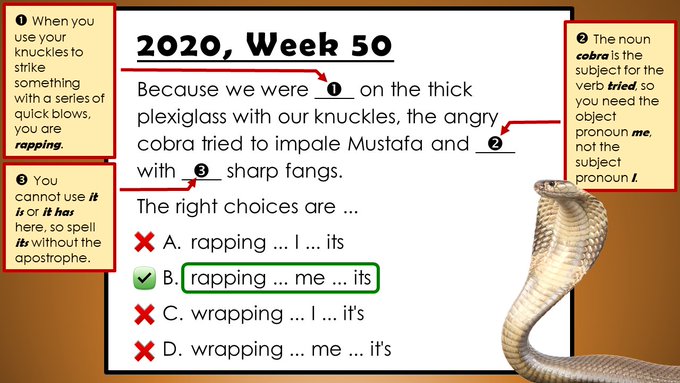
If you teach English this site be one to check out.  This site has handouts, exercises, power points and a weekly  workout on twitter  like the following:

To see the website click here.


Friday, January 8, 2021

13 Everyday phrases that came from Shakespeare


According to Sarah Degnan Moje on Bright Hub,  Thirteen phrases from eleven of Shakespeare’s works have made it into our common vernacular since they were first written down. Some have retained their original meaning from the work in which they were first uttered and some have adapted and shifted over time. My personal favorite and the one that my students are often most impressed with, is that the idea of catching a cold, or having a cold, is something that was foreign before Shakespeare wrote of the concept. People got sick, sure, before he coined the phrase, but the common cold was not called a cold before Shakespeare named it thus!

For example, these thirteen phrases all originated with Shakespeare

Catch a Cold
It’s all Greek to me
Love is Blind
Wild Goose Chase
A Heart of Gold
Break the Ice
Laughing Stock
Wear Your Heart on Your Sleeve
Dogs of War
Method to His Madness
Green Eyed Monster
In a Pickle
The World is Your oyster

These insights and more are contained within the downloadable power point. The lesson is brief enough to be taught in a single class period and simple enough for grades 6th and up to comprehend. Each slide names the play from which the phrase derives, the quote from the play and the meaning of the phrase now. Also included, both for fun and reference are still shots of the plays mentioned. 

To see the powerpoint she created for this click here.

Friday, February 8, 2019

Clever PDF

I saw on Richard Byrne's website the following, "CleverPDF is a free service that anyone can use to convert a PDF into a Word document, a Pages file, or an ePub file. That's just the tip of the iceberg of what's on offer from CleverPDF. The service can be used to create PowerPoint slides, Keynote slides, images, Numbers, and Excel files.

In addition to turning existing PDFs into other formats, CleverPDF can be used to convert other files into PDFs. For example, you can use CleverPDF to create PDFs from Word, PPTX, Excel, and images.

And if you already have a PDF, but need to modify it, CleverPDF has tools for that too. CleverPDF will let you combine PDFs, split PDFs, apply watermarks to your PDFs, and encrypt your PDFs.

I used CleverPDF to convert one of my PDFs into a Word document today. It was quick and easy. I didn't have to register on the site or enter my email address in order to convert my PDF and then download the Word document."

To see CleverPDF click here.

Friday, April 29, 2016

Projeqt - Dynamic Slides


Three out of four Fridays this month I have posted about slide presentations. Projeqt is a dynamic slide maker.  You can easily import your old static  slides and then add some real-time dynamic elements from your favourite services like Facebook or Twitter.


To see the website, click here.

Friday, April 15, 2016

Great Presentations by Garr Reynolds

garrreynolds.com

Last Friday I posted about "Slides That Rock".  See that by clicking here.  I found another great site that you might want to read or have your students read before doing a presentation.   He lists 10 great points with examples under the topics of Prepare, Design and Deliver.  To see these click here.


Friday, April 8, 2016

Slides That Rock


Tattoo Girl Front.003
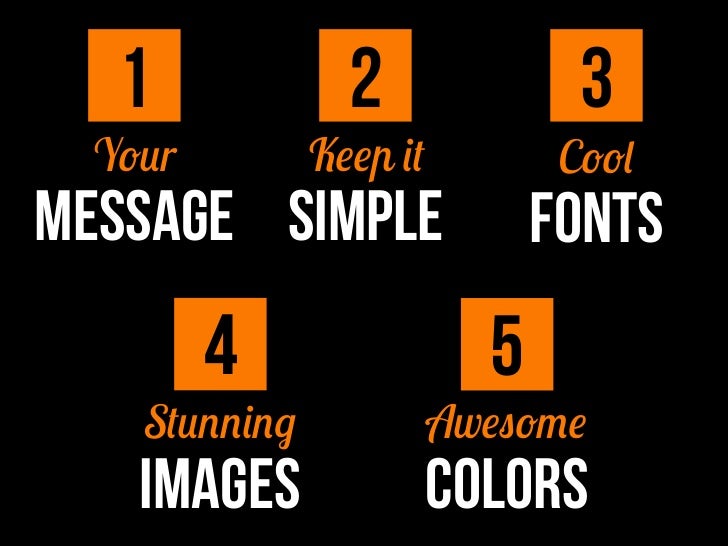
"Slides that rock" is a website that will give you some great ideas on how to make your slide presentations, well, ROCK.  Take a look at their website by clicking here.


Wednesday, March 30, 2016

History Classes by Tom Richey


Tom has a website that is designed for those that teach history.  He has many videos and powerpoint slides for courses such as World History, AP US History, AP European History and AP US Government.  Each course is broken down into categories.   To see the Power Point slides click here.
You can also look at each course to see the associated videos or the course syllabus by clicking on the drop down menu under "Courses".

Tuesday, October 13, 2015

Free French Language Power Points


Most of these free powerpoint presentations are for K-8 but I am sure some might work in your grade 9 classroom.  Take a look by clicking here.

Monday, May 6, 2013

Prezi


Many teachers and students use power points.  I have posted about alternatives to Power Points ( click here) before.  Many teachers at KCI have seen or have used Prezi but I thought it might be worthwhile showing some.  The first one below just shows what you can do as an educator using Prezi.


Here are a couple of examples of Prezis by French teachers.


Here is a Prezi about making Prezis from a grade 7 student.